By the OnBoard IT Tech team, a licensed LA installer (CA #1039864). Serving Los Angeles since 2015.
Studio City homes come in all shapes, from classic ranch-style houses near Ventura Boulevard to newer builds tucked into the hills. That variety is part of what makes home theater installation here interesting and, honestly, a little tricky to plan without some guidance. Whether you’re converting a spare bedroom into a dedicated screening room or adding a clean, unobtrusive setup to your living room, the right approach depends on your space, your viewing habits, and how much wiring is already in your walls.
This guide walks through what actually matters when you’re comparing options for home theater installation in Studio City, so you can make a confident decision instead of guessing.
Start With the Room, Not the Gear
A lot of homeowners start by shopping for a TV or projector first. We’d suggest flipping that order. The room itself determines what equipment will actually perform well.
Think about:
- Room shape and size. A long, narrow room behaves differently than a square one, especially for sound. Echo and flat spots in audio are often a room problem, not a speaker problem.
- Light control. Studio City gets a lot of natural light, which is great for daily living but can wash out a projector screen. Rooms with heavy drapes or shutters are much better candidates for projector-based setups than rooms with bare windows facing south.
- Seating distance. Screen size should match how far you’ll sit from it. A screen that’s too large for a small den can actually hurt the viewing experience rather than help it.
- Existing wiring. Older Studio City homes, especially those built before structured wiring was standard, often need new low-voltage cabling run through walls, attics, or crawl spaces to support modern components cleanly.
Once you know the room’s strengths and limits, choosing between a projector and screen, a large-format TV, or a hybrid setup gets a lot easier.
Decide What “Home Theater” Means for Your Household
Not every home theater installation looks the same, and that’s a good thing. Before you call anyone for quotes, it helps to have a rough idea of how your household will actually use the space.
Some common directions homeowners in Studio City take:
- A dedicated media room with a projector, drop-down or fixed screen, and surround sound, built for movie nights and sports.
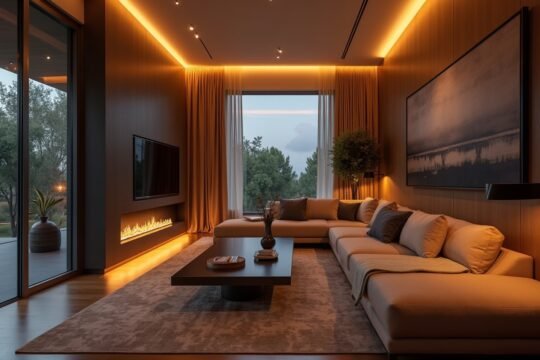
- A living room upgrade where the theater components blend into daily life, with in-wall or in-ceiling speakers instead of floor-standing towers, and wiring hidden behind the wall rather than run along baseboards.
- A simpler two-channel or soundbar setup paired with a large TV, for households that want better sound without a full surround system.
There’s no wrong answer here. The goal is matching the installation to how you’ll realistically use the room, not building the most elaborate system possible. If you’re not sure which direction fits your space, our team can walk through the options with you during a home theater system installation consultation.
Plan for Clean, Hidden Wiring
One of the biggest differences between a DIY-looking setup and a professional one is how the cabling is handled. Visible wires running along the floor or draped over furniture are distracting, and over time they tend to get kicked, chewed by pets, or tripped over.
A proper low-voltage installation runs cabling inside the walls and ceiling wherever possible, so your speakers, screen, and components connect cleanly without visible cords. This matters for:
- Speaker wire to in-wall or in-ceiling speakers
- HDMI and signal cabling to a projector or wall-mounted TV
- Network cabling if your components stream content or connect to a home network
- Low-voltage control wiring for shades, lighting controls, or multi-room audio, if you’re adding those down the line
This kind of structured cabling work should always be done by someone familiar with routing cable safely around a home’s existing systems, without disturbing insulation, plumbing, or anything outside the scope of low-voltage work. If any part of your project calls for new electrical outlets or line-voltage work, that piece gets handled by a licensed electrician, since our team focuses specifically on low-voltage systems like audio, video, and control wiring.
Mounting the Screen or TV Correctly
A TV or projector screen that’s mounted at the wrong height, angle, or distance can undercut even a great system. A few things worth getting right:
- Height. The center of the screen should generally land at or near eye level for the primary seating position, not above a fireplace where it forces you to look up for hours.
- Wall type. Plaster, drywall, brick, and stucco each require different anchoring approaches. Studio City’s mix of older and newer construction means this isn’t always a one-size-fits-all job.
- Projector throw distance. If you’re using a projector, the distance between the projector and the screen has to match the lens and screen size, or the image won’t fill the screen properly.
- Ventilation and heat. Components tucked into cabinets or built-ins need enough airflow to avoid overheating, especially with receivers that run warm during long movies.
Getting the mount right the first time saves you from redoing drywall work later, which is one of the more frustrating (and avoidable) mistakes in home theater installation.
Think About Future Flexibility
Technology changes, and so do household needs. A good installation plan leaves room to add or adjust components later without tearing into walls again. A few ways to build in that flexibility:
- Run a few extra low-voltage cables during the initial install, even if you don’t need them yet. It’s far easier to pull extra cable once than to open a wall again in two years.
- Choose in-wall or in-ceiling speaker placements that work for both a future soundbar upgrade and a full surround system, in case your needs change.
- Keep your equipment rack or cabinet accessible, so swapping a receiver or adding a streaming device doesn’t require rerouting cables.
This kind of planning doesn’t cost much upfront, but it can save real time and expense down the road.
Why Local Experience in Studio City Matters
Studio City’s housing stock is genuinely varied: older single-family homes, hillside properties with multiple levels, and newer condo and townhome construction. Each of these presents different wiring paths, different wall materials, and different light conditions to plan around.
Our team has handled low-voltage installation work across Los Angeles neighborhoods with this kind of variety, with industry experience going back to 2004 and OnBoard IT Tech serving Los Angeles directly since 2015. That background helps us walk into a home, assess the room quickly, and recommend a setup that fits the space rather than forcing a generic solution onto it.
Frequently Asked Questions
Do I need a dedicated room for a home theater installation, or can it work in a living room? A dedicated room gives you more control over lighting and sound, but plenty of great setups live in multipurpose living rooms. The key is choosing components and speaker placement that fit the room’s light and shape rather than assuming you need a separate theater room.
Can you hide all the wiring, even in an older Studio City home? In most cases, yes. We assess the walls, attic access, and crawl space during a site visit to figure out the cleanest path for cabling. Some homes are easier than others, but hidden wiring is almost always achievable with the right planning.
What’s the difference between a projector setup and a large TV setup? Projectors generally need good light control and more room depth to work well, while large-format TVs handle daytime light better and fit more easily into living spaces. Your room’s lighting and layout usually point toward one option over the other.
Will I need an electrician for any part of this project? If your project needs new outlets or other line-voltage electrical work, that portion is handled by a licensed electrician. Our team focuses on the low-voltage side, including cabling, speakers, screens, and system wiring.
Ready to Plan Your Home Theater?
Choosing the right setup for your Studio City home comes down to understanding your room, your household’s habits, and how the wiring will actually get installed behind the scenes. If you’d like a second set of eyes on your space, we’re happy to help. Learn more about our home theater system installation approach, or reach out directly.
Call us at (818) 564-3496 or request a free on-site assessment through our contact page to get started.